Tuesday, May 20, 2014

ChordEase 1.0.5 adds Output Notes bar, playing notes via continuous controller

Version 1.0.5 is up, and it adds two nice features: an output notes bar, and the ability to play through ChordEase using a continuous controller to generate notes, as opposed to a keyboard.

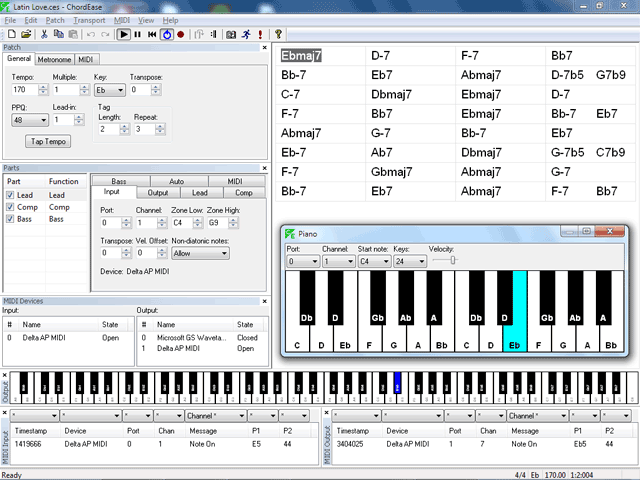
The output notes bar is a piano control, but unlike the virtual piano, it doesn't accept input; its purpose is to let you see exactly what notes your input notes are being mapped to in real time. It has filtering capability, i.e. you can show output notes only for a specific device and/or channel, though by default all output notes are shown, except for the metronome, which has its own special filter setting.

To play ChordEase using a continuous controller, you simply assign a controller to the Part's "Input Note" MIDI target. This can been done manually or via MIDI "Learn". Now spin the wheel (or wave your hand at your theremin, or whatever) and notes should come pouring out. You might want to set the Part's "Non-diatonic notes" setting to "Skip", unless you want lots of "out" notes or have very steady hands. As mentioned in a previous post, "Skip" mode greatly compresses the diatonic scale, reducing the octave to a fifth, and thus could be interesting for those with unusually short fingers, less than the usual number of fingers, etc.

Download it here.

Monday, May 19, 2014

Theremin-friendly handling of non-diatonic notes

Regarding non-diatonic note handling, I discovered a fourth mapping mode mode, which will be very useful when using a continuous controller (e.g. a theremin) to generate input notes. In this new mode, which I call "Skip", the non-diatonic notes are skipped over instead of merely being disabled. This effectively normalizes the diatonic scale, and makes the diatonic notes evenly spaced in controller steps. On a keyboard, the mapping looks like this (for the chord scale of C Lydian):

in out
C3 C3
Db3 D3
D3 E3
Eb3 F#3
E3 G3
F3 A3
Gb3 B3
G3 C4 (octave)
Ab3 D4

etc.

Note that the octave is now reduced to a fifth. All other intervals are similarly compressed. This might be of interest to those with unusually short fingers (children?) or other physical challenges. This mode also facilitates "wild" gestural playing, because it not only eliminates the need to avoid hitting black keys, but also ensures that all keys are "live" and play a unique diatonic note. It might be interesting to try it on a MIDI guitar. Chromatic playing would become diatonic playing. The range of a given instrument is increased by approximately half, e.g. a 61-note keyboard would cover more than eight octaves, instead of five octaves (61 / 7 = 8.71)

I have not actually implemented this mode yet, but I believe I have the math figured out and will begin implementing it ASAP. It's actually very simple, just a multiply, a divide, a modulo, and a table lookup:

int Diatonic[7] = {0, 2, 4, 5, 7, 9, 11}
int NoteOut = NoteIn / 7 * 12 + Diatonic[NoteIn % 7];

So to recap, the proposed non-diatonic note methods are: Allow, Quantize, Disable*, and Skip.

"Allow": a black key creates an accidental unless the adjacent white keys are mapped such that they're a half-step apart, in which case the black key generates a redundant note. This is the default and what I normally use, because it (sometimes) allows chromatic notes. A theremin player would be obliged not only to maintain correct absolute position (to avoid the "black keys" floating in space), but also to move different distances depending on the absolute sizes of the intervals between diatonic tones. In other words, if two diatonic tones are separated by a whole step, the motion required to jump from one to the other is twice as big as the motion required if the two diatonic tones that are separated by a half step. It would be easier to play than a real theremin, due to the elimination of microtones, but still quite difficult.

"Quantize": a black key is mapped to the nearest diatonic tone; i.e. all black keys generate redundant notes. A theremin player would probably find this mode annoying, because it would generate many duplicate notes. However this mode may be useful for MIDI guitar or other fretted but "sloppy" instruments, because misses are corrected instead of being discarded as they are in "Disable".

"Disable": a black key does nothing, i.e. it's dead wood. There are no longer any "black keys" to trip over, and for a theremin player this would probably be a huge improvement. However the diatonic tones still aren't evenly spaced in controller coordinates, so a theremin player would still have to move different distances depending on the absolute sizes of the intervals between diatonic tones, i.e. if the distance between two diatonic notes is bigger, the player has to move further. Some might find this preferable to "Skip", it could be a matter of preference.

"Skip": the chromatic scale is mapped to the diatonic scale, such that the octave fits within a fifth, as described above. All keys are enabled, and none of them generate redundant notes. The diatonic is normalized, such that the amount of physical motion required to jump from one scale tone to an adjacent one is always the same. This would be ideal for a theremin, in my view.

*Disable was previously called "suppress" or "reject".

Note that the above explanations become inaccurate if a non-octave input transposition is specified, however if one substitutes "diatonic tone" for "white key" and "non-diatonic tone" for "black key" the explanations remain correct. For example if input transposition is 2, to get diatonic notes, one must play down a whole step, i.e. in Bb major. This means the "white keys" are now Bb, C, D, Eb, F, G, A, and Bb, and the "black keys" are B, Db, E, Gb, and Ab. This would be true in "Allow", "Quantize" and "Disable", but in "Skip", the result will be more complicated.

Output notes bar

The next version will feature an Output Notes bar. Unlike the piano dialog, it doesn't accept user input; its only purpose is to show the output notes. It has the following features:

  • dockable bar
  • changes to vertical orientation automatically, depending on aspect ratio
  • supports filtering by port and/or channel
  • metronome notes are filtered out separately (this behavior is optional)
  • piano size is selectable: 49, 61, 76, 88, or 128 keys
  • optional key labels showing MIDI note names
  • handles multiple instances of the same note, e.g. from different ports/channels
  • handles bar being shown while notes are active, no dropouts

Tuesday, April 29, 2014

Latest version can show chord tones on piano keys

ChordEase 1.0.3 was released today. It adds new features, and also fixes some bugs. The piano keys can now be configured to show the chord tones and tensions for each chord, dynamically updated as the song plays. This is done using the piano dialog's context menu. The MIDI Device bar now includes the state (open or closed) of each device, and a MIDI Note Mappings dialog was added, which summarizes how input notes are mapped to output notes. The song file extension was changed from .txt to .ces to avoid conflicts with other applications, but unfortunately this means existing users must uninstall their older version before installing 1.0.3.

The screen shot below shows the chord tones on the piano keys. This is in Lead mode, in which the output notes stay as close as possible to the input notes, only adding accidentals as needed. The chord happens to be Bb (Lydian), so in this case all white keys are as usual except B maps to Bb.

Sunday, April 27, 2014

Latest ChordEase includes virtual piano

ChordEase 1.0.2 was released today. This version includes a virtual piano, which allows people to try the software even if they don't have a MIDI keyboard. The piano also shows what notes are being played, and what notes they're being mapped to. There's also a demo command (Help/Demo), which makes it much easier to understand what the software does and why it's useful.

Wednesday, April 16, 2014

Virtual piano interface

It dawned on me yesterday that ChordEase needs a virtual piano interface that you can play via the mouse and/or the PC keyboard. This would allow people who haven't got a MIDI instrument to try out ChordEase, using the Microsoft software synth that's built in to Windows. This feature would also be very handy for debugging in cafes. :) And, it should be possible for the virtual piano's keys to show which notes they're mapped to at any given moment, which would allow you to see how the chord scale is changing as you proceed through the song.

The virtual piano would need a drop list for selecting which part you want to play. It would be nice if it also had a slider or two, for testing controllers that you've assigned to parameters. It's not that much work and it's high value, compared to many other items on the list, though documentation is still the top priority. The list is growing exponentially at the moment, but that's normal at this stage of a project.

Sunday, April 13, 2014

ChordEase: play music with challenging chords easily on any MIDI instrument

ChordEase lets you play music with difficult chords easily on any MIDI instrument. It's primarily intended for jazz, but it can be also useful for any type of music that modulates frequently. ChordEase ensures that all your notes are harmonically correct, but their sequence and rhythm are up to you. In other words, ChordEase handles the rapid music theory calculations, so you can relax and concentrate on groove, feel, and aesthetics. If (like me) you're a musician who struggles with improvising to jazz or similarly harmonically challenging music, you owe it to yourself to try ChordEase.

ChordEase plays songs, which are set up beforehand. You're expected to stay in sync with ChordEase, and it provides a metronome to facilitate this. Normally you play only in the key of C major, and your notes are then adjusted in real time to fit the song's harmony, using various schemes. Any number of performers can perform through a single instance of ChordEase, using any number of MIDI instruments. Any number of parts can be defined, splits and layers can be set up, etc. Parameters can be changed in real time via MIDI controllers, and the output can be recorded and exported as a standard MIDI file.

ChordEase is certainly a work in progress but the version available today is fully functional. Download it HERE.